
Adobe Analytics API Guide
Where to find your Adobe Analytics username and secret, API limitations, reports, and error descriptions
Accessing the Adobe Analytics Connector
To access your Adobe Analytics account using our connector, you must link your credentials first.
How do I find my Adobe Analytics login details (username and secret):
- Log in to Adobe Analytics.
- Click the Admin tab and then under User Management, click Analytics Users & Assets
- On the Account Information page, under Web Services, you’ll see the Username and Shared Secret. If you don’t see it, ask someone with Admin rights to give you access to Web Services.
- Username format is username: company and the secret is 32 characters long.
In order to use the Adobe Analytics connector, your Adobe account needs to be API-enabled by the account admin.
Adobe Analytics API Limitations
The Adobe API is really slow. Feel free to write a message to Adobe’s Client Care and ask them to put more power behind their API.
- Certain metrics may only be requested along with certain elements (dimensions).
- Elements (dimensions) have restrictions on which other elements (dimensions) can be combined within a report.
- The maximum number of top elements that can be requested is 50,000.
- A report may have a maximum number of three or four elements (dimensions).
For more info regarding the Adobe API, please refer to their documentation.
Adobe Analytics API Reporting
1. Adobe Analytics API documentation refers to dimensions as 'elements.'
2. To find calculated metrics from your Adobe Analytics account in the connector drop-down menu, make sure they’re shared with everyone in your Adobe Analytics account.
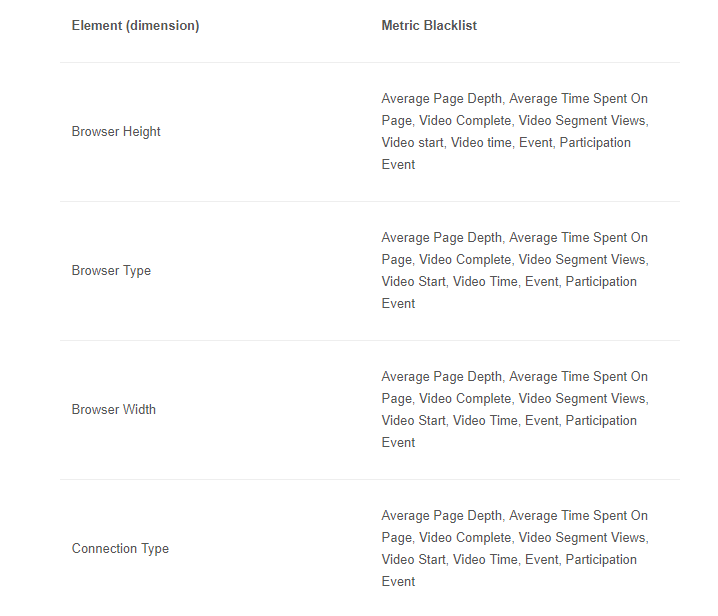
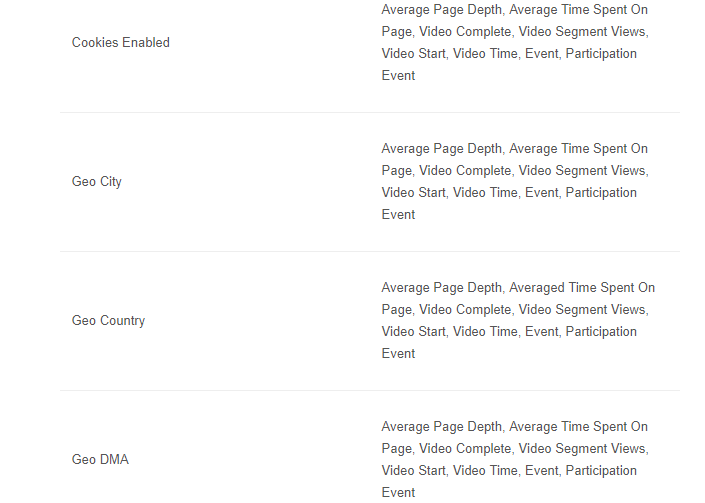
Certain metrics may only be requested along with certain dimensions, and dimensions can only be queried with certain dimensions.
The tables below help you build a valid API query.
The following elements (dimensions) can only be queried with the metrics in the right column.
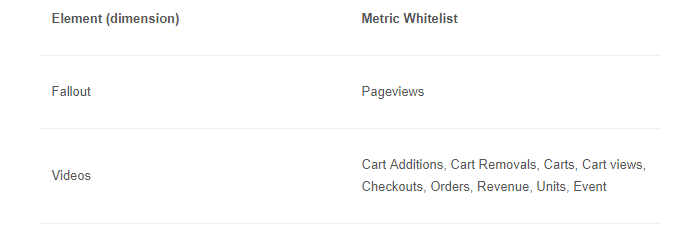
The following elements (dimensions) can be queried with any metric except for those that appear in the right column.
Adobe Analytics API Errors
If you run into an error message when submitting a query, feel free to contact us on our website through our chatbox, in the lower right corner.
We'll get back to you in one business day.
Send us your error message, along with the specifics of your issue (screenshot of the complete query that generated the error) so we can replicate the error and troubleshoot it.
The following adjectives in error codes have specific meanings:
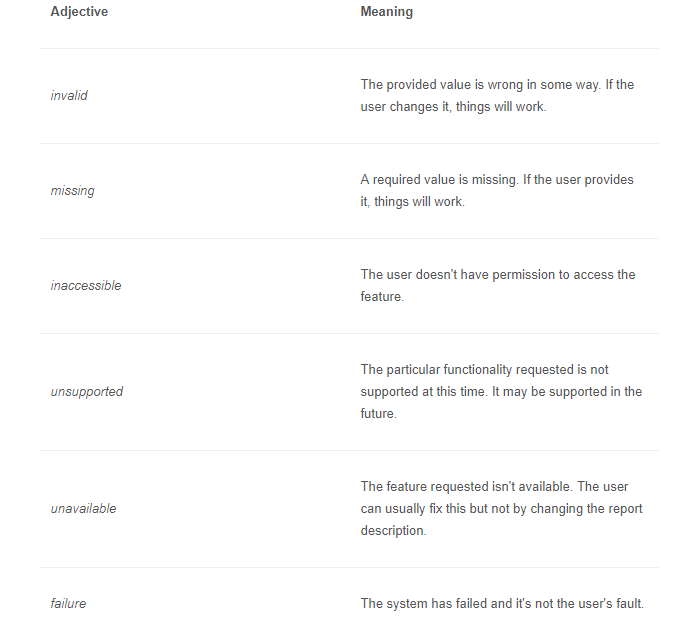
For more info regarding the 1.4 API Error messages, please refer to Adobe’s documentation.